Is DFViewer legit?
DFViewer is a third-party app run by an advertiser in our network. You download the app and make a paid subscription or credit purchase to access private Instagram profiles and stories anonymously. The catch: you have to pay to use the main features after installing.
How DFViewer works
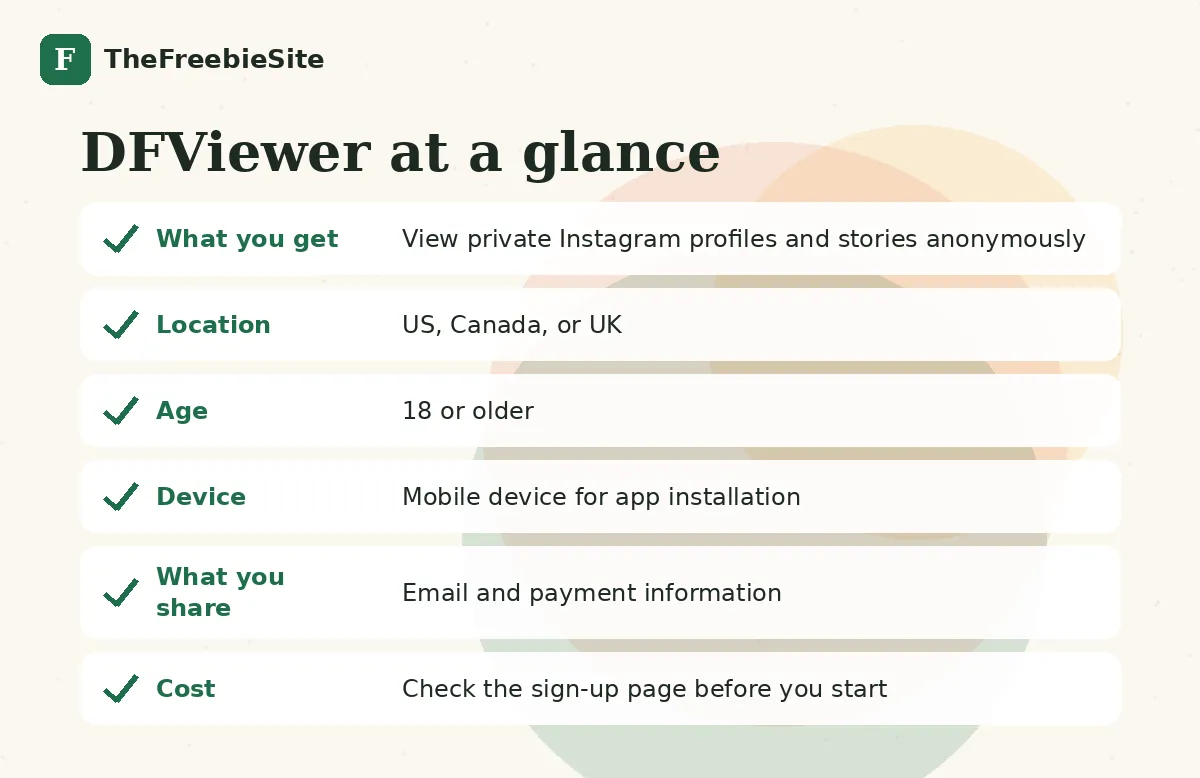
DFViewer is a digital tool designed to let you view private Instagram profiles, stories, and activity without the account owner knowing. It's run by an advertiser in our network and targets adults aged 18 to 45 in the US, Canada, and the UK who are interested in social media analytics and privacy tools.
To sign up, you download the app to your device, create an account, and then browse to find the Instagram profiles you want to view. Once you've selected a profile, the app offers you access through a paid subscription or by purchasing credits. You complete the payment to unlock the viewing features. Offers like this typically count as a sign-up once you've finished the purchase.
After you complete your purchase, you should have access to the restricted profile data through the app. Depending on how the app works, you may receive follow-up communications about your account, subscription renewals, or credit offers. If you signed up with an email, the advertiser may send you service emails or promotional messages related to the app.
Before you download and pay, read any terms of service the app provides to understand what data you're sharing and how your privacy is handled. Never share your Instagram login credentials with any third-party app, and be aware that viewing private accounts without permission may violate Instagram's terms of service. If you want to stop using the app or receiving communications, look for account settings or an unsubscribe option within the app itself.
What you need
How to sign up
- Download the DFViewer app to your phone
- Open the app and create an account
- Search for the Instagram profile you want to view
- Select a subscription or credit purchase option
- Complete the payment transaction
Pros and cons
What we like
- Lets you view private Instagram profiles and stories without being detected
- Targets adults seeking social media analytics and privacy insights
- Available in three countries: US, Canada, and UK
What to watch
- You must pay for access to unlock profile viewing features
- Using the app to view private accounts may violate Instagram's terms of service
Who runs DFViewer
DFViewer is offered by an advertiser in our affiliate network. TheFreebieSite is not the operator; the advertiser's own terms apply.
The advertiser does not state the cost of subscriptions or credits, how much access you get per purchase, or any refund policy.
FAQ
Is DFViewer legit?
DFViewer is a real app offered by an advertiser in our network, but it's a paid service,you have to buy a subscription or credits after installing. Before you pay, understand that viewing private Instagram accounts without permission may break Instagram's rules, and you should read the app's terms of service to see what data you're sharing.
Does DFViewer cost anything?
Yes. The app itself is free to download, but you have to pay for a subscription or purchase credits to view private Instagram profiles and stories.
How does viewing Instagram anonymously work?
After you install DFViewer and create an account, you search for an Instagram profile in the app, choose a paid access option, and complete the purchase. The app then gives you access to view that profile's private stories and activity without the owner being notified.
What should I check before downloading DFViewer?
Check any terms of service or privacy policy the app provides so you know what happens to your data. Never share your actual Instagram login credentials with the app, and understand that Instagram may not allow third-party tools to access private accounts, so your account could face consequences.
Can I get my money back if I'm not happy?
Look for a refund policy in the app's settings or terms before you pay.
How do I stop getting emails from DFViewer?
Check the app's account settings or contact section for an unsubscribe or notification preferences option. If you no longer want to use the app, you can delete it from your device, but contact DFViewer directly if emails continue.
Similar offers on TheFreebieSite